-
EibiSpace B25 Stored DX Labels CSV file
I developed this easy-to-use browser-based converter to make updating kiwiSDR DX labels more convenient. Since the EiBi listing is updated regularly - perhaps once or twice a month - this tool allows you to quickly generate fresh DX labels without hassle.
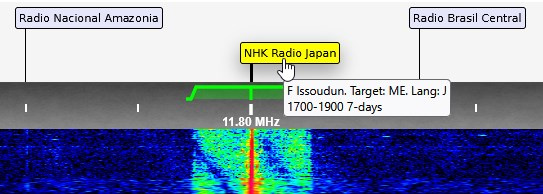
As an additional enhancement, I’ve included more detailed transmitter site information extracted from the EiBi listing. This provides extra context for HF BC listeners in particular, compared to the original KiwiSDR labels, and may offer added value for those who want more precise details. Of course, the usefulness of this feature will depend on individual preferences, but I hope it proves helpful.
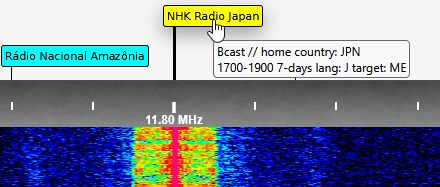
Example of an original label:
Example of a label with more context:



-
Advice on sharing RX antennas with 3 SDRs in the most effective way
Thanks for all the comments, appreciated! In our case, we decided to use a simple T splitter to share the GPS signal with two Kiwis (the two Kiwis are powered by the same PSU). This setup worked for us, but your mileage may vary. Please read the comments from WA2ZKD before anything.
-
Displaying sunrise and sunset times at your Kiwi QTH in your Kiwi UI
If you wish to show the sunrise and sunset times at the location of your Kiwi SDR, please remove all code in the Status field under the Webpage tab in the Admin interface, and replace it with the following HTML code:
In the example above, the la or the LATITUDE parameter in the URL is set to zero, as is the lo or the LONGITUDE parameter. You must set them to those of your QTH. Please note that southern latitudes are negative numbers as are western longitudes.
The sunrise and sunset times are all in UTC, and can be found here:
73 Jari OH6BG


-
Displaying sunrise and sunset times at your Kiwi QTH in your Kiwi UI
If you wish to show the sunrise and sunset times at the location of your Kiwi SDR, please remove all code in the Status field under the Webpage tab in the Admin interface, and replace it with the following HTML code:
In the example above, the la or the LATITUDE parameter in the URL is set to zero, as is the lo or the LONGITUDE parameter. You must set them to those of your QTH. Please note that southern latitudes are negative numbers as are western longitudes.
The sunrise and sunset times are all in UTC, and can be found here:
73 Jari OH6BG -
Displaying sunrise and sunset times at your Kiwi QTH in your Kiwi UI
If you wish to show the sunrise and sunset times at the location of your Kiwi SDR, please remove all code in the Status field under the Webpage tab in the Admin interface, and replace it with the following HTML code:
In the example above, the la or the LATITUDE parameter in the URL is set to zero, as is the lo or the LONGITUDE parameter. You must set them to those of your QTH. Please note that southern latitudes are negative numbers as are western longitudes.
The sunrise and sunset times are all in UTC, and can be found here:
73 Jari OH6BG -
Displaying sunrise and sunset times at your Kiwi QTH in your Kiwi UI
If you wish to show the sunrise and sunset times at the location of your Kiwi SDR, please remove all code in the Status field under the Webpage tab in the Admin interface, and replace it with the following HTML code:
In the example above, the la or the LATITUDE parameter in the URL is set to zero, as is the lo or the LONGITUDE parameter. You must set them to those of your QTH. Please note that southern latitudes are negative numbers as are western longitudes.
The sunrise and sunset times are all in UTC, and can be found here:
73 Jari OH6BG -
Displaying sunrise and sunset times at your Kiwi QTH in your Kiwi UI
Please check it now. It will return "? Mar-21 03:55 ? Mar-21 16:26". -
Displaying sunrise and sunset times at your Kiwi QTH in your Kiwi UI
If you wish to show the sunrise and sunset times at the location of your Kiwi SDR, please remove all code in the Status field under the Webpage tab in the Admin interface, and replace it with the following HTML code:
In the example above, the la or the LATITUDE parameter in the URL is set to zero, as is the lo or the LONGITUDE parameter. You must set them to those of your QTH. Please note that southern latitudes are negative numbers as are western longitudes.
The sunrise and sunset times are all in UTC, and can be found here:
73 Jari OH6BG -
EibiSpace B25 Stored DX Labels CSV file
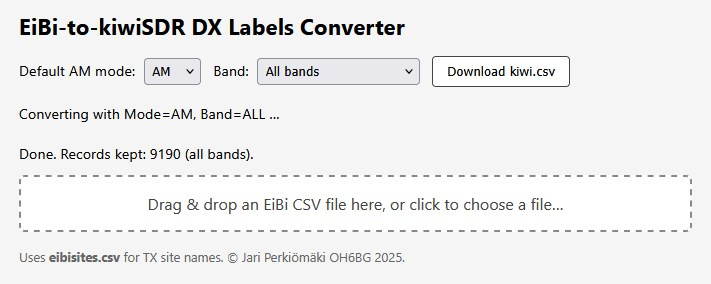
Just a FYI: A lightweight HTML tool is now available to convert CSV-formatted EiBi shortwave schedules into a ready‑to‑use "kiwi.csv" DX‑label file for KiwiSDR receivers. It runs entirely in your browser — no installation, no server, no data upload. Just download "eibi2kiwi.html" and "eibisites.csv" from https://github.com/OH6BG/eibi2kiwi, open them locally, and the conversion happens on your own machine.
You’ll need the latest EiBi schedule from: http://www.eibispace.de/ . Select the "CSV database" and drop the EiBi CSV file onto the page (or use the file chooser).
The script uses "eibisites.csv" to expand transmitter codes into full site names, making waterfall labels more informative. Before conversion, you can set two preferences: (1) Default demodulation mode (AM or SAS), and (2) Frequency range (all entries or only HF above 2000 kHz).
Click the "Download kiwi.csv" button to generate the file. The script filters out expired transmissions, interprets EiBi day‑of‑week formats, adjusts modes automatically (e.g. DRM or USB when noted), and normalizes station names. The result is a UTF‑8 CSV sorted by frequency, ready to import under the KiwiSDR "DX" tab (Import: CSV).
This free tool delivers polished DX labels in just a few clicks.

Home › jpe › Best Of...


