Best Recent Content
-
Low noise amplifier (LNA)
If you are using a T2FD at low height, you may possibly benefit from an LNA.
A lot depends on your local circumstances and level of background noise and interference.
The KiWi has a noise figure of around 14dB (from memory), which by itself is just about good enough for reception on the upper HF bands, providing a reasonable antenna is connected. This noise figure is more than adequate on the lower frequency bands, as the natural noise floor is much higher, and the receiver noise contribution becomes much less significant.
One test you can perform is to listen on a quiet HF frequency, typically between 20 and 30MHz, then make a note of the receiver noise floor, with the antenna connected, and then disconnected.
If there is an increase of 6dB, or more, with the antenna connected, then adding an LNA will not make any difference.
This is most likely because you have a high level of noise and interference, especially in an urban area, and your efforts would be better served by trying to locate and remote the sources of the noise, if at all possible. From experience, most high levels of noise, usually originate in your own home, or that of near neighbours, so you may stand a chance of improving things.
If the noise level doesn't increase by 6dB, then your antenna in not big or high enough, and adding an LNA may help. As is the case with "Loop on the Ground" or "Wire on the Ground" antennas, which by themselves have very low gain.
If you are using an LNA, then the test should be conducted by removing the actual antenna (or loop), and not the LNA output to the receiver, as it needs to include the additional LNA gain and noise contribution.
If you don't have an LNA connected, and have massively more than 10dB of increase in noise with the antenna connected, then you have serious noise problems, and these definitely need resolving.
If you do have an LNA connected, then it would be better to apply some attenuation, so that the noise increase is around 6dB, as this is the "sweet spot" in terms of system sensitivity vs. Dynamic range and IMD generation.
I hope this helps,
Martin

-
Problems when accessing KiwiSDR from macOS Tahoe 26.1
Version 26.2 is out, the problem is still there on iPadOS and iOS, it works as before on macOS. Strange …
Eckhard

-
EibiSpace B25 Stored DX Labels CSV file
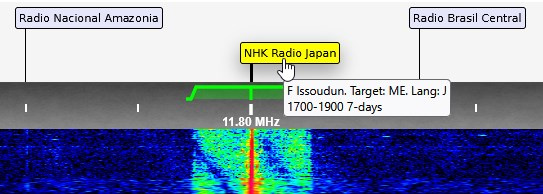
I developed this easy-to-use browser-based converter to make updating kiwiSDR DX labels more convenient. Since the EiBi listing is updated regularly - perhaps once or twice a month - this tool allows you to quickly generate fresh DX labels without hassle.
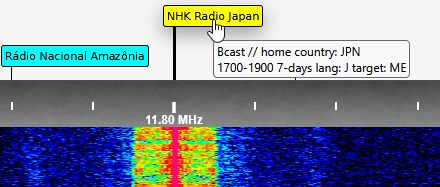
As an additional enhancement, I’ve included more detailed transmitter site information extracted from the EiBi listing. This provides extra context for HF BC listeners in particular, compared to the original KiwiSDR labels, and may offer added value for those who want more precise details. Of course, the usefulness of this feature will depend on individual preferences, but I hope it proves helpful.
Example of an original label:
Example of a label with more context:



-
Opinions needed: Ham radio digital modes -- what's currently being used?
The latest issue of Amateur Radio (Vol 93) has a great article on FreeDV on HF, by Peter VK3TPM. This has prompted me to do a bit of further digging around, and it really does seem like a great step forward, and so impressive that the codec is open source.
It appears that FreeDV can run on a Raspberry Pi, so I wonder if it's possible to add this as an extension inside KiwiSDR?
I also confirmed that there was a decent level of activity to listen to, such as on 7177 kHz. (Actually, this is potentially confusing... the traffic was below 7177kHz, as though the old analog LSB convention was being used... anyway...). It's easy to find active traffic, by searching for a transmitting station on the QSO reporter at https://qso.freedv.org/
In summary : sure would be cool to have the ability to decode and listen to FreeDV directly inside the KiwiSDR!
73,
Chris
VK6KCH
-
EibiSpace B25 Stored DX Labels CSV file
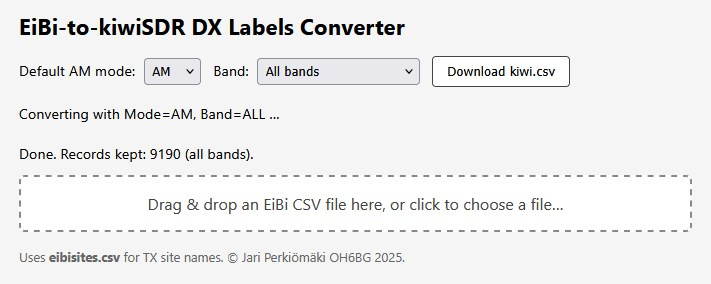
Just a FYI: A lightweight HTML tool is now available to convert CSV-formatted EiBi shortwave schedules into a ready‑to‑use "kiwi.csv" DX‑label file for KiwiSDR receivers. It runs entirely in your browser — no installation, no server, no data upload. Just download "eibi2kiwi.html" and "eibisites.csv" from https://github.com/OH6BG/eibi2kiwi, open them locally, and the conversion happens on your own machine.
You’ll need the latest EiBi schedule from: http://www.eibispace.de/ . Select the "CSV database" and drop the EiBi CSV file onto the page (or use the file chooser).
The script uses "eibisites.csv" to expand transmitter codes into full site names, making waterfall labels more informative. Before conversion, you can set two preferences: (1) Default demodulation mode (AM or SAS), and (2) Frequency range (all entries or only HF above 2000 kHz).
Click the "Download kiwi.csv" button to generate the file. The script filters out expired transmissions, interprets EiBi day‑of‑week formats, adjusts modes automatically (e.g. DRM or USB when noted), and normalizes station names. The result is a UTF‑8 CSV sorted by frequency, ready to import under the KiwiSDR "DX" tab (Import: CSV).
This free tool delivers polished DX labels in just a few clicks.

-
Inactivity time / 24hr per-IP addr time limit
But the entire point of giving a password is to not be timed out under any circumstances. This requirement mostly came from people wanting to do long-term recording on a fixed frequency. And were given an exemption password by the Kiwi owner/admin to do so.

-
QiwiQ a KiwiSDR client for Android: looking for feedback, testers and comments
@XPloRR Sorry, this is a very bad time of year for me. Dozens of big problems stacked up ahead of you. People waiting..
You need to detect an impending inactivity or 24hr timeout. And then react to it in some manner, which may not be in the same way the Kiwi UI does.
When the inactivity time remaining drops below 1 minute you might show a panel like the kiwi does. And if that panel is ack'd send a "SET inactivity_ack" message on the SND socket. That will reset the inactivity timer (this is an alternative to actually making a change, e.g. frequency change, which also resets the timer). If the user doesn't ack and the connection closes then you can show something that says to reload. In your case pressing the 1/0 button I guess. The Kiwi doesn't give an opportunity to enter an exemption password after an inactivity timeout. Because the password can be given in the URL ahead of time. But you might want to (as described below).
When the 24hr time expires, and the connection closes, you can present a panel asking for an exemption password. If given then reopen connection giving ipl=(exemption pwd) as you show.
How to tell of an impending inactivity or 24hr timeout. This is a little tricky because it was done in the easiest possible way for the Kiwi UI. Not in the easiest way for a general API.
Figure out what rx channel number you're connected to (N) by looking for a msg on the WF socket early on of the form "MSG kiwi_up=1 rx_chan=N". This should probably also be sent on SND socket, but it isn't (historical reasons).
Then every 3 seconds on the SND socket you will see a msg like:
MSG user_cb=[
{"i":0,"n":"ZL4VO%2fKF6VO","g":"Tauranga%2c%20New%20Zealand","f":18776350,"m":"usb","z":0,"wf":0,"fc":23,"t":"0:00:43","rt":1,"rn":23,"rs":"0:00:23","e":"","a":"","c":0.0,"fo":0.000,"ca":0,"nc":0,"ns":0},
{"i":1},
{"i":2},
{"i":3}
]
The user_cb value is JSON giving info on all the rx channels. In this case all 4 channels of a Kiwi in 4-channel mode. Since you determined earlier that N=0 you want the first array element of user_cb where i=0. Now look at the object values rt, rn & rs. rt means "remaining type". 0 = no time limits in effect. 1 = inactivity timer will expire soonest. 2 = 24hr timer will expire soonest. rn is the number of seconds until expiration. rs is the h:mm:ss string representation of rn.
So when rn < 60 an expiration will occur within one minute.
Trying to connect when the 24hr limit has been exceeded will cause this msg on the SND socket: "MSG ip_limit=ttt%2cxxx.yyy.zzz.www" where ttt is the 24hr limit in minutes, %2c is the hex encoding for the "," character and xxx.yyy.zzz.www is the source ip address the incoming connection. Receiving this msg is what triggers the display of the exemption password panel in the Kiwi UI.

-
Inactivity time / 24hr per-IP addr time limit
- If a 24hr limit exists then each second a particular IP is connected adds to its 24hr counter. If the limit is exceeded you can no longer connect until the counter is cleared. The counter is cleared at the time your Kiwi checks for software updates. Which is somewhere between 1-6 AM local time depending on your serial number.
- When you give the correct exemption password all time limits are ignored.
-
Inactivity time / 24hr per-IP addr time limit
Sorry -- now disconnected from admin page.
The admin user tab doesn't affect the timeout mechanisms.
-
KiwiSDR 2 production status
December 3, 2025: Our kiwisdr.nz store is temporarily sold out. More units available December 15. Distributors have plenty: DX Engineering (US), ML&S (UK), WiMo (DE).
As always thanks for your support. Enjoy the holidays.